
Spotify: Music and Podcasts
Spotify ABMusic & Audio
4.31.86M Reviews
- Version
- Varies With Device
- Installs
- 1.00B
- Age Rating
- Teen
Screenshots
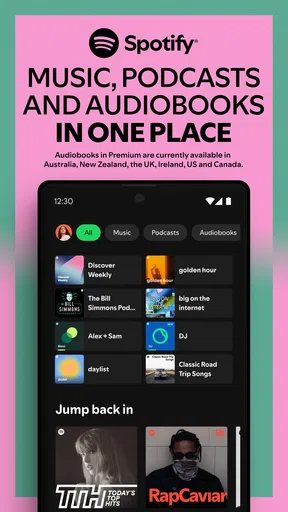
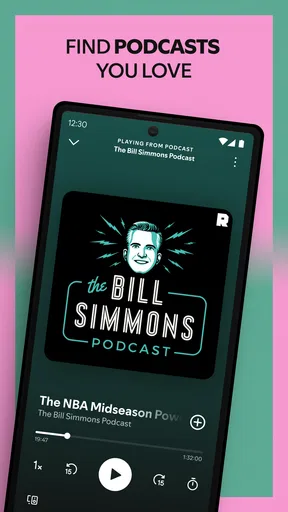
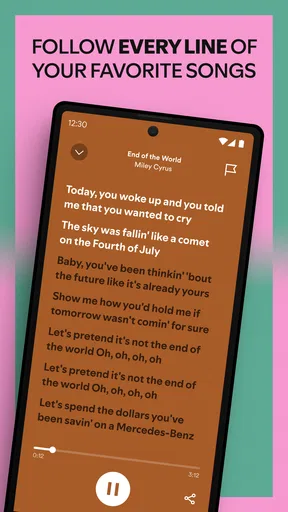
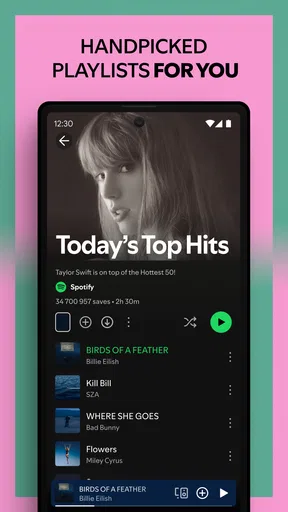
Our Review of Spotify: Music and Podcasts
 Analysis by Appyee
I tend to judge a listening app by what happens after the first few days: whether it helps me find something worth hearing, makes it easy to return to a saved favorite, and fits into ordinary routines without constant fiddling. Spotify: Music and Podcasts does those jobs well, especially if you move between music and spoken audio. It is a free music and audio app from Spotify AB, though in-app purchases are available and some listening choices may depend on the plan you use.
For a quick example, I might start a playlist while getting ready, switch to a podcast on the commute, then return to an album later without rebuilding my queue from scratch. That combination is the app’s clearest strength: it puts different kinds of listening in one place. Its Teen content rating is worth keeping in mind for families, since a shared device or account may not be the right setup for every younger listener.
How Spotify Fits into Everyday Listening
Spotify has been available since May 27, 2014, and its current scale is hard to miss: it has over one billion installs and a 4.3 average from around 35 million ratings. Those figures suggest broad appeal, but they do not tell me whether the app will suit a particular listener. In my experience, the deciding factor is less the size of the audience than whether its mix of discovery, library management, and paid options matches your habits.
Discovering Endless Music and Podcasts
Let’s kick things off with the music. With Spotify, it feels like the world of music is at your fingertips. Whether you're into the latest chart-toppers or obscure indie bands, Spotify’s got your back. The app’s algorithm is pretty smart too. It learns what you like and dishes out daily mixes that, more often than not, hit the right note. Plus, the "Discover Weekly" playlist is like a treasure chest of new tunes waiting to be uncovered.
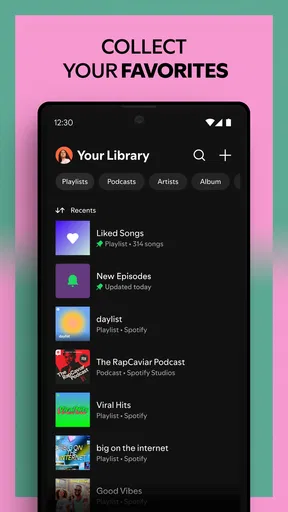
For me, recommendations work best as a starting point rather than a substitute for searching. If a suggested track fits the mood, I can follow the trail to an artist or album; if it misses, I can go straight back to something familiar. A small but useful habit is to save discoveries as I listen instead of trusting myself to remember them later. That turns an enjoyable recommendation into something I can actually find again, and it gradually makes my own library more useful.
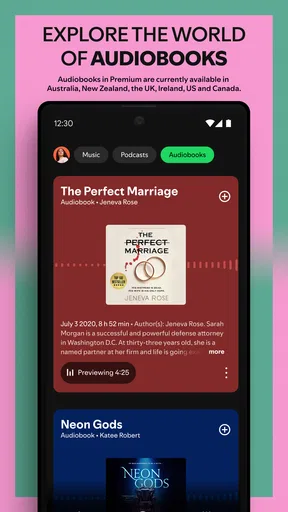
But it’s not just about music. If podcasts are your jam, then you're in for a treat. Spotify hosts a massive library of podcasts ranging from true crime to self-help, and everything in between. It’s like having a radio station tailored just for you, whenever you want.
The music-and-podcast combination is particularly handy when my attention changes during the day. Music works for a walk or a focused stretch of work; a podcast suits a longer trip when I want a voice-led story or discussion. I would not assume every show or track will be available in every situation, though: catalogs and listening options can vary, so I treat search as the practical test before building a routine around a particular program.
Easy Peasy Interface
Let’s talk about the interface. It’s sleek, intuitive, and just downright user-friendly. Navigating through playlists, albums, and podcasts is a breeze. You won’t find yourself fumbling around trying to figure out where everything is. The layout feels natural, and the search function is pretty robust. Just type in a song, artist, or podcast, and you’re good to go.
Search is more useful when I have only part of a clue: an artist name, a phrase from a title, or the subject of a podcast. I still check the result carefully before pressing play, since similar names and versions can make a quick search less precise than it seems. If I already know what I want, going directly to the artist or show is usually quicker than browsing recommendations; if I am undecided, browsing is where the app earns its keep.
One trade-off is that a broad catalog can make choosing feel like work. Recommendations reduce that effort, but they can also keep circling familiar tastes if I listen to the same kinds of tracks repeatedly. When I want a change, I deliberately search outside my usual artists or start with a specific mood or genre rather than waiting for the home screen to surprise me. That is a more reliable way to steer discovery than expecting any algorithm to read my mind.
Customize Your Listening Experience
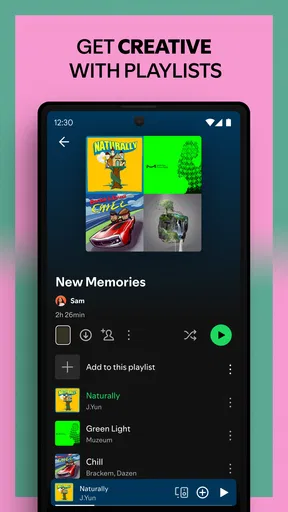
One of my favorite features is the ability to create and share playlists. Whether you’re curating a list for a road trip or just need some background music for studying, Spotify’s playlist feature is top-notch. You can even download your favorite tracks and podcasts for offline listening, which is a lifesaver when you’re out of Wi-Fi range.
Playlists are most useful when I give each one a clear purpose instead of treating them as a pile of saved songs. I might keep one for a regular walk and another for a long drive, then add tracks as I come across them. Collaborative playlists are a different tool: they work when a group is contributing to one shared soundtrack, while an ordinary playlist is better when I want to control the order and mood myself. Before a trip, I check that the items I expect to hear are actually downloaded; offline access is helpful, but it is not a substitute for preparing ahead.
And let’s not forget about the sound quality. With options to adjust the quality, you can tailor your listening experience based on your data or Wi-Fi connection. It’s the little things that make a big difference.
That setting is worth adjusting with your connection in mind. If I am listening over mobile data, choosing a more conservative quality can help avoid using data unnecessarily; on a stable Wi-Fi connection, I can prioritize how the audio sounds. I also think it is sensible to test the change with headphones I know well, rather than assuming a higher setting will make every recording noticeably better. The practical goal is a comfortable balance, not a setting that looks impressive on paper.
Offline listening and sound settings also reveal the difference between a free starting point and a paid listening setup. The app itself is free to install, and in-app purchases range from $5.99 to $400 per item, but I would check the current plan details in the app before deciding what to buy. The important question is how you listen: if uninterrupted, prepared offline sessions matter to you, compare the available plan terms with your routine; if you mostly listen casually while connected, paying may not be necessary.
Social Features That Connect
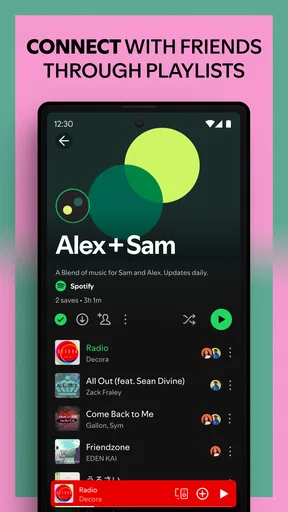
Another aspect I love is the social component. You can follow friends, see what they’re listening to, and even collaborate on playlists. It brings a whole new dimension to sharing music and discovering what others are jamming to.
I find those tools most rewarding when they solve a specific social problem: a group can build a shared playlist for a gathering, or I can borrow a friend’s recommendation without sending a string of song titles back and forth. They are less essential if I prefer listening privately or curate everything myself. I would also treat friend activity as a source of ideas, not a measure of taste; the feature works best when it adds a little context to listening rather than competing for attention.
Plus, if you’re someone who likes seeing what artists are up to, Spotify keeps you updated with concerts and events happening near you. It's like having a personal music guide in your pocket.
For event discovery, I see this as a convenient prompt to investigate an artist I already enjoy, rather than the only place to plan a night out. I would still check the event details before making arrangements. Used that way, it connects listening with the possibility of seeing music in person without turning the app into a full trip planner.
Where It Shines—and Where I’d Look Elsewhere
Compared with a service built mainly around radio-style playback, Spotify gives me more direct control over playlists, saved albums, and moving between music and podcasts. That makes it a strong fit if I like to shape my own listening and still want recommendations when I run out of ideas. A service tied closely to a particular phone ecosystem may feel more convenient for someone who already buys music or manages devices there, while a specialist podcast app can be a better choice for a listener who wants spoken audio to be the whole experience.
I would also consider a different option if my priority were owning music files, keeping a collection independent of a subscription, or using a service whose catalog and plan terms better match my region. Streaming is convenient, but it is not the same as owning a permanent copy. For someone who wants one familiar app for mixed listening, that trade-off may be worthwhile; for someone who wants complete control over files and playback, a locally managed library may make more sense.
For an everyday scenario, imagine a busy morning: I put on a familiar playlist while making breakfast, save a new track that catches my ear, and switch to a podcast once I am on the way out. Later, I add the saved song to a playlist for a weekend drive. The useful part is not merely having a large selection; it is being able to carry a small chain of listening choices from one part of the day to another without starting over each time.
Who Should Try It, and What to Keep in Mind
I would recommend Spotify to people who want music discovery, flexible playlists, and podcasts together, especially if they listen in different settings across the week. It is also a good fit for friends or households who enjoy making shared playlists, provided everyone is comfortable with the account and content setup. If you mainly want a simple player for files already stored on your phone, or you do not want recommendations and streaming to shape your listening, its broader features may be more than you need.
New users often wonder whether they can try it without paying. Yes, the app is free to install, while purchases are offered inside it; I would review the options shown in the app and decide based on the features I would actually use. Another practical question is whether listening can continue without a connection. Downloads make offline listening possible for selected music and podcasts, so I would prepare them while online and check the downloaded items before leaving reliable service.
People also ask whether Spotify is only for songs. It is not: podcasts sit alongside music, which is useful if you want both in one listening routine. And if recommendations feel repetitive, I would not immediately assume discovery has stopped working. I would search for unfamiliar artists, explore a new genre, or save a few different kinds of listening; the app can only learn from the signals I give it.
A Mature App Still Worth Making Your Own
Spotify AB’s app has had years to become familiar, and its large audience is reflected in around 1.8 million reviews as well as its strong install reach. I see that scale as context, not proof that it is automatically the right pick. The lasting value comes from the personal setup: useful playlists, a sensible download routine, and recommendations that I actively guide instead of accepting without thought.
Its main friction is the same one that comes with a broad streaming service: choices can pile up, paid options require a little comparison, and a recommendation can miss the mark. Those are manageable if I use search when I know what I want, keep playlists organized, and treat suggested listening as optional. If I want a tightly curated personal library or a podcast-first workspace, another kind of app may suit me better.
So, is Spotify: Music and Podcasts worth trying? I think so if you want one approachable place for songs, podcasts, discovery, and playlists, and you are happy to shape it around your own habits. I would start free, make a few purposeful playlists, test downloads before relying on them, and see whether the recommendations improve with use. For me, that is the fairest way to judge it: not by how much it promises to contain, but by whether it makes the next thing I want to hear easy to find.
Privacy and Permissions
See what permissions an app requests and how it handles your data.
- Identity
- find accounts on the device
- Contacts
- find accounts on the device
- Location
- approximate location (network-based), precise location (GPS and network-based)
- Phone
- read phone status and identity
- Photos/Media/Files
- read the contents of your USB storage, modify or delete the contents of your USB storage
- Storage
- read the contents of your USB storage, modify or delete the contents of your USB storage
- Camera
- take pictures and videos
- Microphone
- record audio
- Wi-Fi connection information
- view Wi-Fi connections
- Device ID & call information
- read phone status and identity
- Other
- view network connections, pair with Bluetooth devices, access Bluetooth settings, send sticky broadcast, change network connectivity, allow Wi-Fi Multicast reception, full network access, change your audio settings, control Near Field Communication, run at startup, use accounts on the device, control vibration, prevent device from sleeping, install shortcuts, read Google service configuration
How Spotify: Music and Podcasts Compares
Full ComparisonYouTube Music suits listeners who want music alongside videos, Spotify fits playlist-led discovery and podcasts, and Apple Music appeals to subscribers seeking ad-free listening and strong audio.
| App | Developer | Rating | Price |
|---|---|---|---|
 YouTube Music | Google LLC | 4.4 | Free |
 Spotify: Music and PodcastsThis App | Spotify AB | 4.3 | Free |
 Apple Music | Apple | 4.5 | Free |
Verdict
Strengths of Spotify: Music and Podcasts
- Vast music library with millions of tracks.
- User-friendly interface for easy navigation.
- Offline listening with Premium subscription.
- Personalized playlists and recommendations.
- Cross-platform sync for seamless experience.
Limitations of Spotify: Music and Podcasts
- Ads interrupt playback in free version.
- Limited skips for free users.
- High data usage on mobile networks.
- Some songs may not be available in all regions.
- Premium can be costly for some users.
Other Releases by Spotify AB
View All
Spotify: Music & Podcasts
Music & Audio3.9

Spotify for Creators
Music & Audio3.7
Similar Picks in This Category
View All
YouTube Music
Google LLC4.4

Samsung Music
Samsung Electronics Co., Ltd.3.8

JioSaavn - Music & Podcasts
Saavn Media Limited4.3

Lark Player:Music Player & MP3
Lark Player Studio - Music, MP3 & Video Player4.6

StarMaker: Sing Karaoke Songs
SKYWORK AI PTE. LTD.4.3

Shazam: Find Music & Concerts
Apple Inc.4.8
You May Also Like
View All


Frequently Asked Questions
What features does Spotify offer for free users?
Spotify's free version offers access to a vast library of music and podcasts. However, it includes ads, and users can only shuffle play songs on mobile devices. Some features, like offline listening and unlimited skips, require a Premium subscription. Despite these limitations, free users can still enjoy personalized playlists and discover new artists.
How does Spotify Premium enhance the listening experience?
Spotify Premium removes ads and allows users to download music for offline listening. It also offers unlimited skips and lets you play any song on demand, even on mobile devices. The sound quality is higher, providing an enriched audio experience. Premium also includes exclusive access to certain podcast episodes and early releases.
Can Spotify be used offline?
Yes, Spotify Premium users can download playlists, albums, and podcasts to listen offline. This feature is helpful for conserving data or when you are in areas with poor internet connectivity. Free users do not have access to offline listening, making premium a worthwhile consideration for those frequently on the go.
What devices are compatible with Spotify?
Spotify is compatible with a wide range of devices including smartphones, tablets, desktop computers, smart TVs, and gaming consoles. It supports both Android and iOS platforms. Additionally, Spotify Connect allows you to stream music to compatible speakers and other smart devices, enhancing your listening experience across different environments.
How does Spotify handle user privacy and data?
Spotify collects data to personalize the user experience, including listening habits and preferences. Users have control over their privacy settings and can choose what information to share. Spotify's privacy policy outlines their data handling practices, ensuring transparency. It's crucial for users to review these settings to align their privacy preferences with Spotify's services.
